
Laser Engraving ABS Plastic: Material Properties, Optimal Settings, and Trade-Offs
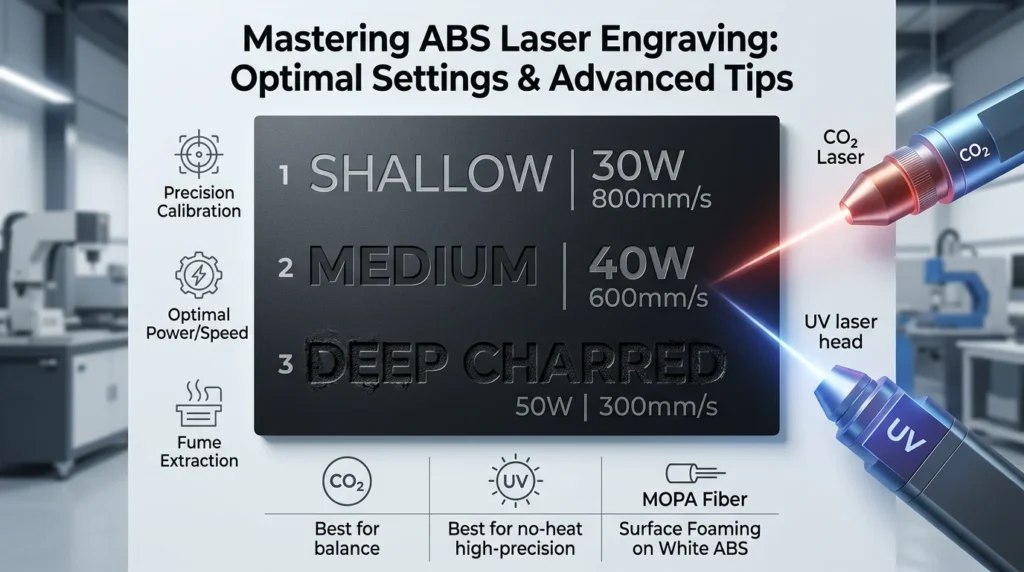
ABS is a versatile engineering plastic for laser engraving it produces clean, contrast-rich marks with minimal residue compared to cutting the same material. However, ABS has specific engraving requirements: incorrect settings cause charring, surface stress cracking, or toxic fume output.
This guide covers the material science behind ABS laser engraving, optimal equipment settings, safety considerations, and how to specify ABS for engraving work without damaging the part or your equipment.
Why ABS Works for Laser Engraving (But Not Laser Cutting)
Engraving vs. Cutting (The Thermal Difference)
- Laser engraving uses lower power/longer dwell to vaporize a thin surface layer (0.1–0.5 mm depth).
- Laser cutting requires high-power pulses to melt or ablate through the full material thickness.
- ABS engraving is thermally controlled; ABS cutting causes rapid heat buildup, leading to charring, melting, and decomposition.
Why ABS Engraves Well
- ABS absorbs CO₂ laser wavelengths (10.6 µm) effectively; energy converts predictably to surface ablation.
- The mark contrast is naturally high. ABS vaporizes darker or slightly charred at the edges, creating sharp definition.
- Dwell time is short; the part surface doesn’t reach the thermal stress zone that causes cracking.
Material Properties of ABS Relevant to Laser Engraving
Melting Point and Decomposition Temperature
- Melting point: 220–250°C (varies by grade and additives)
- Thermal decomposition: begins around 300°C; rapid decomposition above 350°C
- Laser engraving operates: 150–250°C at the surface (depending on power, speed, and repetition rate)
- Key insight: Engraving is below or near melting; cutting pushes well into decomposition territory
Impact of Glass Filling on Engraving
- Unfilled ABS: cleanest engraving, lowest char, best mark contrast
- Glass-filled ABS (10–30% GF): engraves but produces slightly more debris and char residue; fiber reinforcement doesn’t vaporize as cleanly as the resin matrix
- Recommendation: Specify unfilled ABS if engraving quality is critical
Impact of Colorants and Additives
- Natural/unfilled ABS: most predictable engraving behavior
- Pigmented ABS: darker colors (black, navy, dark gray) engrave to lighter contrast; opaque pigments may char differently than resin
- UV-stabilized grades: contain additives that may decompose at laser temperature; check material supplier specs
- Flame-retardant ABS: FR additives increase charring tendency; engraving more sensitive to power/speed tuning
Optimal Laser Engraving Settings for ABS
Laser Source Selection (CO₂, UV, & MOPA Fiber)
- CO₂ Laser (10.6 µm): The standard workhorse for ABS processing. Absorbs predictably, providing balanced depth and speed.
- UV Laser (355 nm): The gold standard for high-precision, zero-heat (“cold process”) marking. Ideal for medical devices, electronic keycaps, and micro-text where zero thermal stress or charring is permitted.
- MOPA Fiber Laser (1064 nm): Standard fiber lasers pass through raw ABS, but MOPA lasers allow pulse duration tuning to achieve controlled surface “foaming”, producing crisp, high contrast dark marks on light/white ABS without burning.
Balancing Mark Depth vs. Charring
- Shallow/Clean Marks: 300–500 mm/s, 15–25 W power.
- Medium/Dark Marks: 150–300 mm/s, 25–35 W power.
- Deep Marks: Under 150 mm/s, 35+ W power (high risk of stress cracking).
Test Matrix Recommendation
Before running production:
- Create a test engraving with 3–5 power levels (20W, 30W, 40W, etc.)
- Create a test engraving with 3–5 speeds (400, 600, 800, 1000 mm/sec)
- Inspect each for:
- Mark contrast (is text/image readable?)
- Char residue (black/brown discoloration around mark?)
- Surface cracking (visible stress lines in surrounding area?)
- Material integrity (does the engraving weaken the part?)
ABS Laser Engraving vs. Alternative Materials
Comparison Table
| Material | Engraving Contrast | Char Residue | Processing Ease | Cost | Best For |
| ABS (unfilled) | High (white-to-black) | Moderate | Good—predictable | Low–Medium | Labels, industrial parts, prototype marks |
| Acrylic | Excellent (frosted white) | None | Excellent—clean vaporization | Low–Medium | Signage, decorative, high contrast needed |
| Polycarbonate | Moderate (brown char mark) | High | Difficult—prone to stress cracking | Medium–High | High-impact applications (avoid laser engraving) |
| Delrin (POM) | Good (brown/tan mark) | Low–Moderate | Excellent—no char | Low–Medium | Precision parts, tight tolerances |
| Nylon | Poor (discolors, melts) | High | Poor—melts rather than vaporizes | Low | Not recommended for laser engraving |
Key takeaway: Acrylic outperforms ABS for mark contrast and cleanness; ABS is the choice when you need an engineering plastic’s mechanical properties AND engraving capability.
When to Choose ABS Engraving Over Acrylic
- Part needs impact resistance or toughness; acrylic is brittle
- Chemical resistance matters (oils, solvents); acrylic degrades
- Thermal environment requires ABS’s higher softening point
- Cost control is critical; unfilled ABS is cheaper than premium acrylic
When to Choose a Different Material
- Acrylic: if contrast and cleanness are paramount, and the part doesn’t need toughness
- Delrin: if precision, dimensional stability, and zero char are required
- Polycarbonate: avoid laser engraving entirely; use CNC marking or mechanical stamping instead
Safety and Ventilation Requirements
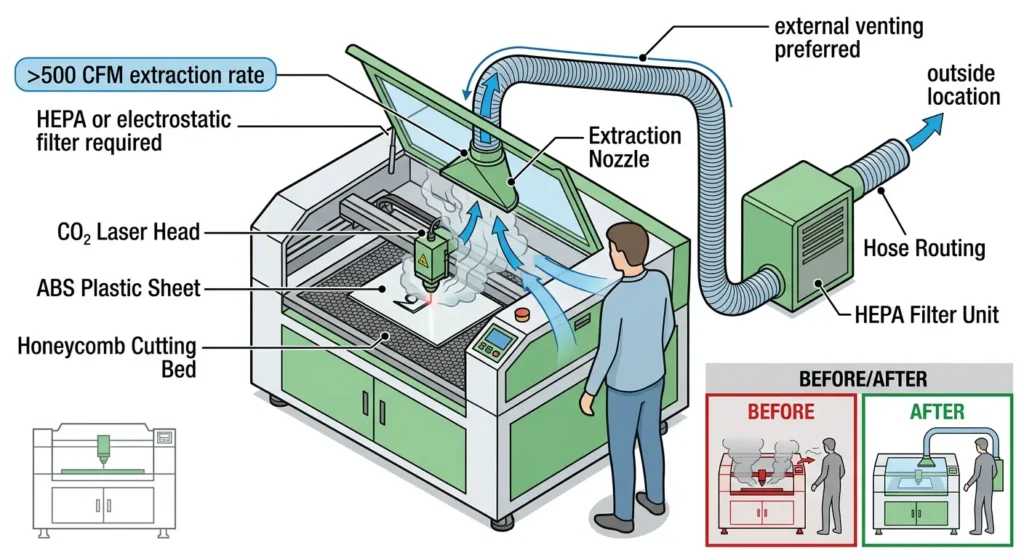
Fume Output During ABS Engraving
- Char decomposition: produces CO₂, CO, water vapor, and fine particulates (soot)
- Additive off-gassing: flame-retardant or UV-stabilized ABS may release volatile compounds at laser temperatures
- Typical fume volume: 5–15 m³/hour per watt of average engraving power (varies by speed/depth)
Required Ventilation
- Minimum: external fume extraction (not recirculation) pulling directly from the laser head area
- Recommended: >500 CFM extraction rate for a typical benchtop CO₂ engraver
- Best practice: HEPA filtration on the extraction exhaust if venting indoors
Personal Protective Equipment (PPE)
- Operator: N95 or P100 particulate mask if ventilation is marginal
- Enclosed machine: fume extraction mandatory; no exceptions for user safety
- Aftermarket filters: activated-carbon filters help with odor but do not eliminate particulates; HEPA or electrostatic filters are necessary
Material Handling & Storage
- Store ABS in a cool, dry place; moisture absorption (though minimal) can cause bubble/pop artifacts during engraving
- Pre-dry ABS stock if stored in humid environments (~50°C for 2–4 hours optional, but helps with fine detail)
ABS Laser Engraving Applications and Use Cases
Industrial & Manufacturing
- Equipment labeling: engraved part numbers, serial numbers, batch codes on housings and enclosures
- Custom fixtures & jigs: engraved identification without compromising structural integrity
- Connector/electrical components: durable identification on plastic housings
Consumer Products & Retail
- Custom nameplates & badges: personalization on instrument housings, tools, appliances
- Promotional items & gifts: branded ABS plaques, trophy bases, custom awards
- Product authentication: QR codes or logos engraved directly into the part
Prototyping & Engineering
- Functional prototypes: mark parts with version numbers, test parameters, or design annotations
- Assembly aids: engrave step numbers or alignment marks on prototype fixtures
- Design validation: low-cost material for testing engraving methods before scaling to production
How to Specify ABS for Laser Engraving (Buyer’s Checklist)
Material Specification Items to Request from Supplier
- Unfilled vs. filled grade: confirm unfilled ABS for best engraving results
- Color & transparency: specify natural/opaque for predictable contrast
- Additive transparency: request confirmation that the grade does not contain UV-absorbing stabilizers or fire retardants that alter engraving behavior
- Surface condition: smooth (not frosted or textured) preferred for sharp marks
- Thermal stability certification: especially if the part will experience elevated temperature post-engraving
Pre-Production Engraving Validation Questions
- Can the supplier provide a test sample? Request a small sheet to run your test matrix before bulk order
- What is the source/batch consistency? Multi-batch orders can vary slightly in additives; confirm consistency if engraving quality is critical
- Is halogen-free certification available? (if you’re sourcing for export or regulatory compliance)
- Thickness tolerance: tighter tolerance means more uniform engraving depth across a batch
Communicating Engraving Specs to Your Laser Service Provider
If outsourcing the engraving:
- Provide a test part or reference image showing desired mark depth and contrast
- Specify if the engraving will be post-painted or UV-exposed (impacts additive choice)
- Request a small-batch proof before full production; allow for parameter fine-tuning
- Ask if they recommend a specific ABS grade or supplier for optimal results
Troubleshooting Common ABS Laser Engraving Issues
Excessive Charring / Black Discoloration
Symptom: Dark residue around engraved marks; edges look burned rather than cleanly vaporized.
Causes: Power too high, speed too slow, or multiple passes over the same area.
Fix: Reduce power by 10–15%, increase speed by 100–200 mm/sec, or reduce number of passes.
Insufficient Mark Contrast / Faint Engraving
Symptom: Engraved mark is barely visible; looks like a light scratch.
Causes: Power too low, speed too fast, or engraving depth set too shallow.
Fix: Increase power by 10–20%, decrease speed by 100–200 mm/sec, or run a second pass at same settings.
Stress Cracking or Crazing Around the Engraving
Symptom: Fine white stress lines appear in the ABS surface near the engraved mark.
Causes: Localized heat and rapid cooling causing internal stress; or part contains residual stress from injection molding.
Fix: Reduce power/speed to lower thermal shock, post-anneal the part (80–90°C for 1–2 hours) to relieve stress before engraving, or specify stress-relieved ABS stock.
Engraving Depth Varies Across the Part
Symptom: Marks are deeper on one side, shallower on the other (or vary batch-to-batch).
Causes: Uneven ABS stock thickness, lens focus drift, or material batch variation in opacity/additives.
Fix: Verify ABS thickness tolerance (±0.1 mm or better), recalibrate laser focus, test new batches with a small sample before production.
FAQ
Can You Laser Engrave All ABS Plastics?
Most unfilled ABS grades engrave cleanly. Glass-filled ABS and flame-retardant ABS are more prone to charring; test first. Highly pigmented ABS may produce lower contrast.
Is ABS Laser Engraving Toxic?
Moderate ventilation with extraction reduces fume exposure significantly. If ABS contains flame retardants (especially brominated), fume toxicity is higher; use external ventilation. Proper extraction and HEPA/electrostatic filtration are essential for safe operation.
Can You Laser Cut ABS Instead of Engraving?
Laser cutting ABS is technically possible but produces significant charring, edge discoloration, and thermal stress cracking. Engraving is the recommended laser method for ABS; cutting should only be done as a last resort or outsourced to professional cutting services equipped for fume management.
How Deep Is an ABS Laser Engraving Mark?
Typical engraving depth is 0.1–0.5 mm depending on power/speed. Deeper marks (0.5–1.0 mm) are possible but increase charring and stress-cracking risk. For deep marks, CNC routing or machining is safer and more predictable.
How Long Does Laser Engraving on ABS Last?
Engraved marks do not wear off, but they can be scratched or abraded by rough handling. UV exposure can slightly fade the contrast if the mark penetrates into pigmented or colorant layers, but the mark itself remains permanent.
What is the Cost of Laser Engraving ABS vs. Other Marking Methods?
Laser engraving: $0.10–$1.00 per part (depending on mark complexity and service provider rates); no tooling cost.
CNC engraving: $0.20–$2.00 per part; slower for high volume.
Silk-screen printing: $0.05–$0.20 per part at scale (1000+ units); requires screen tooling ($200–$500).
Mechanical stamping: $0.05–$0.15 per part; requires custom stamp tool ($500–$2000).

Usama Ayub is the founder of PlasticSpec and a polymer manufacturing engineer with eight years of hands-on industrial experience in PET, PA6, and PA66 fiber and filament yarn production. He writes material property and selection guides for Delrin, Nylon, PEEK, PTFE, UHMW, Polycarbonate, and ABS.