
Laser Cut Delrin: Feasibility, Settings, Safety, and Best Practices
Can Delrin Be Laser Cut?
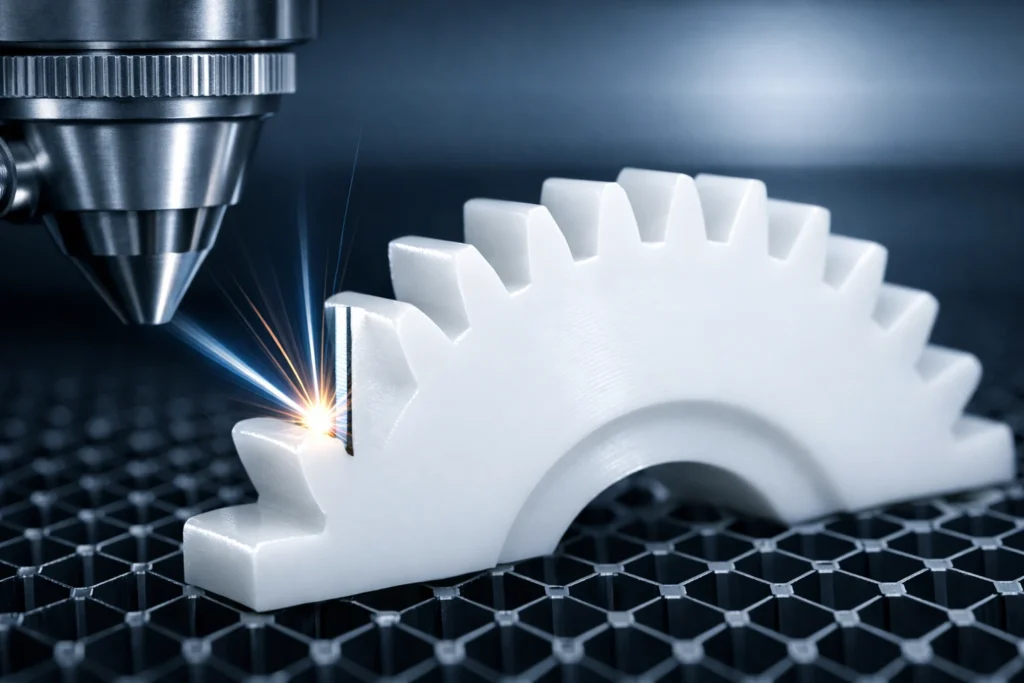
Yes, Delrin (Acetal/POM) is an optimal engineering plastic for CO2 laser cutting. It sublimates (vaporizes) cleanly, leaving a high-gloss, burr-free edge. However, the process releases Formaldehyde gas, making high-volume external ventilation non-negotiable for safety.
Why Engineers Choose Laser Cutting for Delrin
- Low Friction Edges: The laser leaves a smooth, low-friction surface ideal for sliding mechanisms and gears.
- No Mechanical Stress: Unlike CNC milling, laser cutting is a non-contact process, meaning thin or fragile parts won’t snap during fabrication.
- High Detail: You can achieve internal corner radii as small as the laser beam diameter (~0.1mm), which is impossible with traditional drill bits.
What Happens When You Laser Cut Delrin?
Delrin responds uniquely to laser energy compared to other plastics like Acrylic or Polycarbonate. Understanding these three behaviors is critical for high-precision engineering.
Material Behavior Under Laser Heat
Delrin is a semicrystalline thermoplastic that undergoes sublimation.
- The Process: The laser beam breaks polymer chains, converting the solid plastic directly into Formaldehyde gas.
- Result: Because the material skips the “liquid puddle” phase (if settings are correct), the Heat Affected Zone (HAZ) is extremely narrow.
- Efficiency: Delrin absorbs the 10.6µm CO2 wavelength with nearly 100% efficiency, allowing for high-speed processing with minimal power.
Edge Quality and Finish
Laser-cut Delrin produces a signature “Flame-Polished” edge that is often superior to machined edges.
- Appearance: The edges are smooth, semi-glossy, and feel “waxy” to the touch—this is the natural low-friction state of the material.
- Color:
- Black Delrin: Results in a deep black, consistent edge.
- Natural (White) Delrin: Results in an opaque, milky-white edge.
- Post-Processing: Zero. Parts are ready for assembly immediately after cutting.
Risk of Melting and Warping
Despite its clean vaporization, Delrin’s 175°C melting point makes it sensitive to “heat soak” during long cut cycles.
- The “Mushroom” Effect: If the laser moves too slowly, the top of the cut melts outward, creating a rounded, imprecise top edge.
- Warping: Large, thin sheets (2mm) can bow during the cut if the internal stress of the material is released by the heat.
- Small Feature Failure: If two cut lines are closer than 1.0mm, the “rib” between them may melt entirely or lose its structural stiffness.
Is Laser Cutting Delrin Safe?
Yes, but only with industrial-grade precautions. While Delrin does not produce corrosive Hydrochloric acid (like PVC), it presents two major hazards: toxic gas and high flammability.
Formaldehyde Fume Release
Delrin (Acetal/POM) is a polymer of Formaldehyde. When the laser vaporizes the material, it releases pure Formaldehyde gas (CH2O).
- Health Risk: Formaldehyde is a Group 1 Carcinogen and a potent respiratory irritant.
- Immediate Symptoms: Even minor exposure causes stinging eyes, a burning throat, and dizziness.
- Detection: It has a sharp, medicinal odor. If you can smell it, your ventilation is insufficient.
Ventilation Requirements
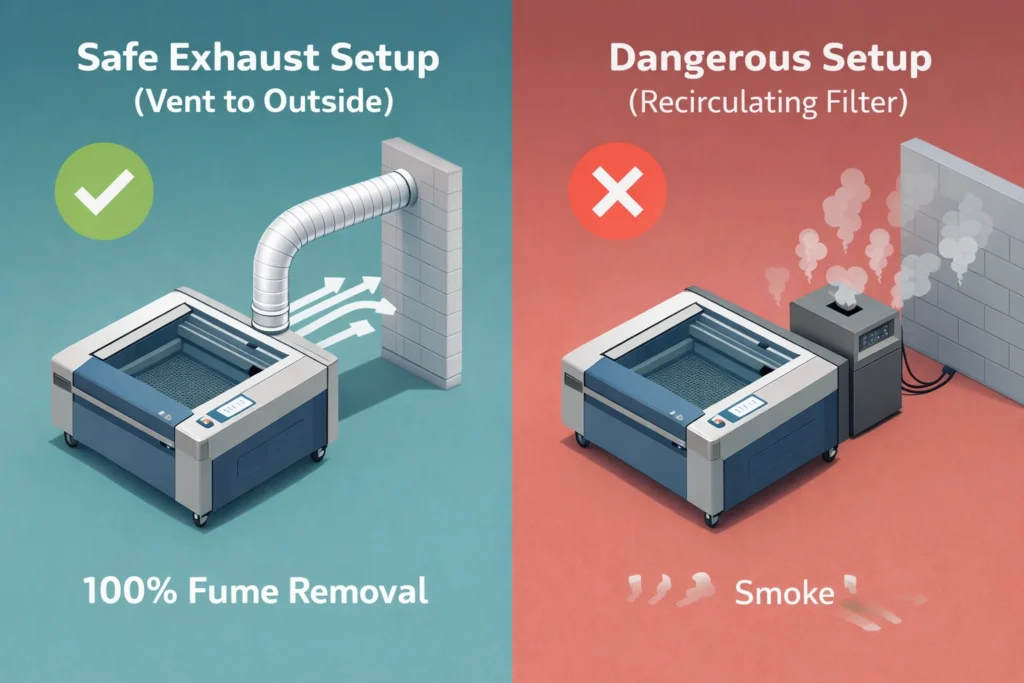
Standard hobby filters are often inadequate for Delrin.
- External Venting: Mandatory. Fumes must be exhausted directly to the outside using a high-CFM (Cubic Feet per Minute) blower.
- Chemical Filtration: If you must use a recirculating filter (like a Bofa or Quatro), it must contain a dedicated chemical stage (specifically treated activated carbon) to neutralize Formaldehyde. Standard HEPA filters will not stop the gas.
- Seal Integrity: Ensure your laser cabinet has a negative pressure environment so no gas leaks into the room through door gaps.
Fire Risk Considerations
Delrin is a thermoplastic fuel that sustains combustion easily.
- The “Invisible” Flame: Delrin can burn with a nearly invisible blue flame, making it hard to detect until it spreads.
- Air Assist: You must use High-Pressure Air Assist to blow out the flame at the point of the cut.
- Bed Safety: Honeycomb beds can trap Delrin “crumbs” which can ignite during the next pass. Clean your tray regularly.
When It Should Be Avoided
Do not laser cut Delrin if:
- You are in a residential or school setting without a direct-to-outside vent.
- Your laser has a leaky or non-existent enclosure.
- You intend to leave the machine unattended for any duration.
- You are using a Diode laser without a full enclosure and high-volume extraction.
Recommended Laser Settings for Delrin
To achieve the “factory-finish” edge Delrin is famous for, you must balance high power with high speed. Low speeds lead to “heat soak,” causing the material to melt rather than sublimate.
CO₂ Laser Compatibility
- Optimal Wavelength: 10.6µm CO₂ lasers are the industry standard. Delrin absorbs this energy with nearly 100% efficiency.
- Minimum Power: A 30W-40W laser is the baseline for thin sheets (1.5mm). For production efficiency on 6mm+ material, an 80W-100W tube is recommended.
Power Settings by Thickness
Settings based on a standard 80W CO₂ Laser. Adjust power ±10% for different wattages.
| Material Thickness | Power (%) | Speed (mm/s) | Frequency (Hz/PPI) | Result |
| 1.5mm (1/16″) | 40–50% | 35–45 | 500 | Clean, instant vaporization. |
| 3.0mm (1/8″) | 60–70% | 20–30 | 400 | High-gloss, vertical edge. |
| 6.0mm (1/4″) | 80–95% | 8–12 | 300 | Minor taper; glossy finish. |
Speed Recommendations
- The “Stay Ahead of the Melt” Rule: Always prioritize higher speed over lower power. If the laser dwells too long, the edge will round off and lose dimensional accuracy.
- Vector Cutting: Use the fastest speed that successfully clears the material in a single pass. Multiple passes on Delrin increase the risk of fire and heavy charring.
Air Assist and Focus Setup
- Air Assist (Crucial): Use High-Pressure Air (20–40 PSI). High pressure chills the cut zone, prevents the “invisible” Delrin flame, and blows vaporized formaldehyde away from the lens.
- Focus Point:
- ≤ 3.0mm: Focus on the top surface.
- > 3.0mm: Focus 1/3 into the material (e.g., for 6mm, set focus 2mm below the surface) to minimize edge taper.
Accounting for Kerf & Tolerance
Delrin is an engineering plastic; precision matters. The laser “kerf” (material removed) for Delrin is typically 0.15mm – 0.25mm.
- For Press-Fits: If you need a bearing to “snap” into a hole, offset your path outward by 0.1mm in your software (e.g., LightBurn “Kerf Offset”).
- For Sliding Parts: Use a 0.05mm inward offset to account for the natural slickness of the material.
- Tolerance Tip: Always cut a 20mm x 20mm test square first. Measure with calipers to calculate your exact machine’s kerf before starting a long production run.
Maximum Thickness You Can Laser Cut
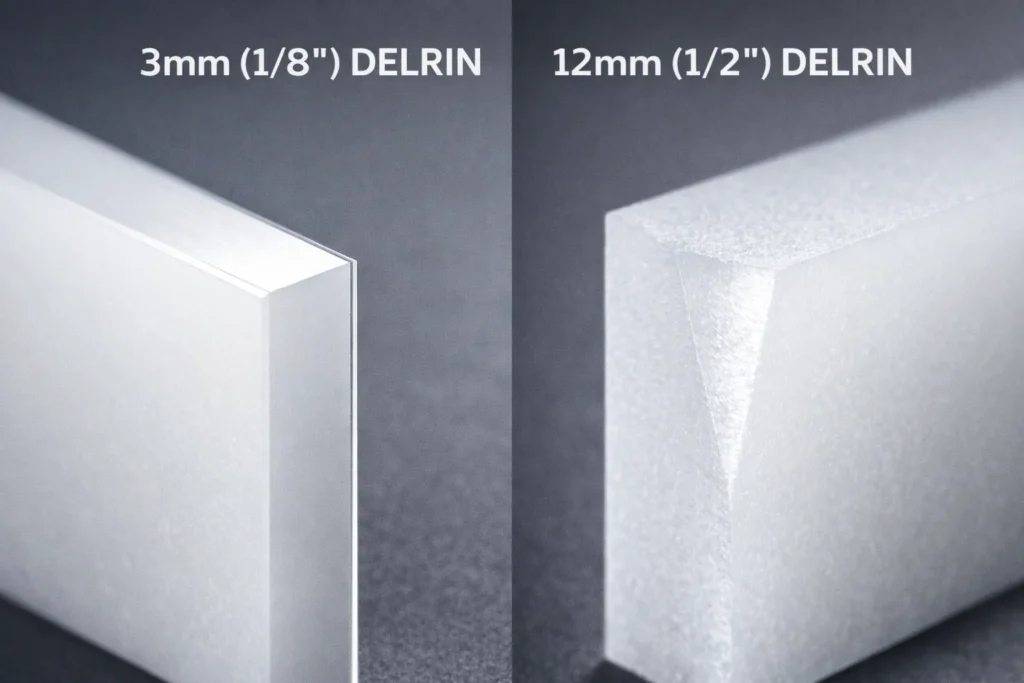
While Delrin is highly laser-compatible, physics dictates a hard limit on thickness. As the beam penetrates deeper, it loses focus and energy density, leading to a “V-shaped” taper rather than a perfectly vertical edge.
Thin Sheet Performance (≤3 mm)
- The “Sweet Spot”: Sheets between 0.5mm and 3.0mm yield the highest precision.
- Edge Quality: Expect a perfectly vertical, mirror-smooth, and burr-free edge.
- Tolerance: Easy to maintain ±0.05mm accuracy.
- Best Use: High-speed production of gears, spacers, and intricate gaskets.
Medium Thickness Limits
- Capability: Most 80W–150W CO2 lasers handle up to 10mm (3/8″) effectively.
- The Trade-off: Speed must drop significantly (often below 5mm/s).
- Taper Factor: You will notice a slight 1° to 3° edge taper because the beam converges at the focus point and diverges below it.
Why Thick Delrin Fails
Attempting to laser cut Delrin thicker than 12.7mm (1/2″) usually results in a failed part for three technical reasons:
- Heat Accumulation: The bottom of the cut stays molten for too long, causing the material to “re-weld” behind the laser path.
- V-Shaped Kerf: The top of the cut becomes excessively wide (0.5mm+) while the bottom barely clears, ruining mechanical tolerances.
- Fire Hazard: The deep “canyon” of the cut traps flammable formaldehyde gas and molten plastic, significantly increasing the risk of a sustained flare-up that can damage your laser’s optics.
Common Problems When Laser Cutting Delrin
Precision engineering requires troubleshooting these four specific failure modes. Most issues with Delrin stem from improper heat management or vapor control.
Excessive Melting
- The Symptom: Rounded top edges, “beading” on the bottom, or parts fused to the scrap.
- The Cause: Speed is too slow or Frequency (PPI/Hz) is too high. The laser is dwelling too long, turning sublimation into melting.
- The Fix: Increase speed by 10% increments or lower your Frequency to 300–400 Hz. Aim for the fastest speed that achieves a single-pass cut.
Edge Discoloration
- The Symptom: Yellowing or brownish charring on the cut face.
- The Cause: Insufficient Air Assist or contaminated optics.
- The Fix: Crank Air Assist to 30+ PSI. This “chills” the edge instantly. Also, ensure your focal lens is clean; a dirty lens scatters the beam, creating a wider, hotter, and “dirtier” cut.
Toxic Odor Issues
- The Symptom: A sharp, stinging chemical smell that lingers in the room.
- The Cause: Formaldehyde gas bypass. Your exhaust system has a leak or the blower is underpowered for the cabinet volume.
- The Fix: Use a smoke pencil to check for cabinet leaks. Ensure your fan moves at least 300–500 CFM. If using a filter, the activated carbon is likely saturated and must be replaced.
Poor Cut Consistency
- The Symptom: The laser cuts through in some areas but not others.
- The Cause: Material warping or an unlevel honeycomb bed.
- The Fix: Delrin has internal stresses. Pin down the sheet using honeycomb pins or weights. A 1mm focus deviation on Delrin significantly degrades cut performance.
Preventing “Smoke Frosting” and Residue
- The Issue: Vaporized Delrin re-condenses into a white, powdery residue (frosting) around the cut line, especially visible on Black Delrin.
- The Solution:
- Primary: Apply high-tack paper masking tape (transfer tape) to both sides before cutting. This traps the residue on the paper, not the plastic.
- Secondary: If you cannot mask, use a Magic Eraser (Melamine sponge) with a drop of water post-cut. It removes frosting without scratching the semi-gloss finish.
CNC Machining vs Laser Cutting Delrin
Choosing between a laser and a CNC mill for Delrin depends entirely on geometry and tolerance requirements. While both process the material efficiently, they yield different mechanical results.
Precision Comparison
- Laser Cutting: Offers a non-contact process with a beam diameter of ~0.1mm. However, the “V-shaped” taper is a physical reality. Expect tolerances of ±0.13mm (0.005″) on thin sheets.
- CNC Machining: Provides perfectly vertical edges with zero taper. With high-end mills, you can achieve tolerances of ±0.025mm (0.001″).
- Winner: CNC for high-precision mechanical fits; Laser for complex 2D profiles.
Surface Finish
- Laser: Produces a melted, semi-glossy finish that is “flame-polished.” It is smooth to the touch but can show “striation lines” if the laser frequency is too low.
- CNC: Leaves a matte, machined texture with visible tool marks unless a secondary finishing pass is performed.
- Winner: Laser for aesthetics and low-friction sliding surfaces.
Cost Comparison
| Factor | Laser Cutting | CNC Machining |
| Setup Time | Minimal (Upload & GO) | High (Fixturing & CAM) |
| Tooling Cost | Zero (Non-contact) | High (End mills wear down) |
| Production Speed | Fast for thin 2D parts | Slow (Layer-by-layer removal) |
| Waste | Low (Nesting efficiency) | High (Material turned to chips) |
When CNC Is the Better Option
Switch to CNC Machining if your project meets any of these criteria:
- Thickness > 12mm: Lasers struggle with deep cuts, resulting in heavy charring and excessive taper.
- 3D Geometries: If your part requires pockets, counterbores, or varying depths, a laser (which is 2D) cannot perform these effectively.
- Strict Tolerance: If your part must have a Press-Fit with zero angular deviation (taper), the laser’s converge/diverge beam path will fail.
- Bulk Blocks: Machining from thick Delrin plate or rod is significantly safer than attempting to “layer” or deep-cut with a laser.
Alternatives to Laser Cutting Delrin
If your workshop lacks industrial-grade ventilation or your parts exceed 12mm thickness, these three alternatives provide high-quality results without the risk of formaldehyde exposure.
CNC Routing
- Best For: Parts requiring pockets, 3D contours, or thickness >12mm.
- Performance: Delrin is arguably the best plastic for routing. It produces “continuous chips” rather than dust, which keeps the work area clean.
- Key Advantage: Unlike laser cutting, CNC routing produces zero taper, ensuring perfectly vertical edges for high-precision mechanical assemblies.
- Pro Tip: Use single-flute O-flute bits to prevent the plastic from melting and wrapping around the tool.
Waterjet Cutting
- Best For: Thick blocks (up to 150mm) and extreme heat sensitivity.
- Performance: Waterjet uses a high-pressure stream of water and abrasive. Since it is a cold cutting process, there is zero risk of melting, warping, or toxic off-gassing.
- Key Advantage: It is the safest method for Delrin. No fire risk and no chemical fumes.
- Trade-off: The finish is matte/satin rather than the glossy “flame-polished” edge of a laser.
Mechanical Saw Cutting
- Best For: Simple linear cuts, strips, and blanks.
- Performance: Delrin can be cut on standard woodworking equipment (table saws, band saws).
- Tooling: Use carbide-tipped blades with a high tooth count (60–80 TPI) to prevent chipping.
- Key Advantage: Speed and Cost. It is the fastest way to break down large sheets into manageable sizes before secondary machining or laser work.
- Safety: Wear a mask; while not as toxic as laser vapors, Delrin micro-shavings are a physical respiratory irritant.
Best Grade of Delrin for Laser Applications
Not all Acetal is created equal. Choosing the wrong grade can lead to slower cut speeds, increased soot, and inconsistent mechanical tolerances.
Homopolymer vs Copolymer
While the terms are often used interchangeably, their performance under a laser differs significantly.
- Homopolymer (Delrin®): This is the premium choice for laser cutting. It has a higher crystallinity, meaning it sublimates faster and leaves a harder, more wear-resistant edge.
- Pro: 15% faster cut speeds than Copolymer.
- Con: More expensive; prone to center-line porosity in very thick blocks.
- Copolymer (Generic Acetal): This is the budget-friendly alternative. It contains more chemical stabilizers that can lead to a “tackier” edge after cutting.
- Pro: Better resistance to hot water and strong bases; no center-line porosity.
- Con: Releases slightly more irritating odors during the laser process.
The Verdict: For precision gears and bushings, always spec Homopolymer (Delrin 100 & 150).
Color Variations and Cut Quality
The pigment used to color the plastic changes how it absorbs laser energy and how it looks post-cut.
- Black Delrin: The easiest to laser cut. The carbon black pigment absorbs the 10.6µm CO₂ wavelength instantly.
- Visuals: Hides heat marks and “charring” perfectly.
- Residue: “Smoke frosting” is highly visible but easily cleaned with a Magic Eraser.
- Natural (White) Delrin: Slightly more difficult to cut as it reflects more ambient light.
- Visuals: Shows “yellowing” if the speed is too slow or air assist is too low.
- Residue: Frosting is nearly invisible, making it better for parts that won’t be post-cleaned.
- Colored Delrin (Red, Blue, Green): These are often Copolymers. The dyes can sometimes cause edge discoloration or a “burnt sugar” smell that differs from standard formaldehyde.
| Feature | Homopolymer (Delrin) | Copolymer (Acetal) |
| Laser Cut Speed | Fastest | Moderate |
| Edge Hardness | Higher | Lower |
| Dimensional Stability | Superior | Good |
| Best Color for Laser | Black | Black |
Final Verdict
| Proceed if… | Switch to CNC if… |
| You have direct-to-outside high-volume exhaust. | You are in a closed room or using a desktop filter. |
| Your part thickness is under 10mm (3/8″). | Your part thickness is over 12.7mm (1/2″). |
| You need complex 2D geometries or gears. | You need pockets, holes, or 3D contours. |
| You require a low-friction, glossy edge finish. | You require zero-taper, perfectly vertical edges. |
FAQs
Does laser cutting Delrin release toxic fumes?
Yes. Laser cutting Delrin releases Formaldehyde gas, which is a known human carcinogen and a severe respiratory irritant. You must use a high-volume external exhaust system or a specialized chemical filter. Standard HEPA/Carbon hobby filters are insufficient to neutralize these toxic vapors.
What is the best laser for cutting Delrin?
A CO2 laser (10.6µm wavelength) is the best tool for cutting Delrin. Delrin absorbs this wavelength with nearly 100% efficiency, allowing for high-speed sublimation. While some high-power Diode lasers can cut Black Delrin, they are ineffective on Natural (White) Delrin and produce lower-quality edges.
Why is my laser-cut Delrin melting instead of cutting?
Melting occurs when your laser speed is too slow or your frequency (PPI/Hz) is too high. Delrin requires high power and high speed to sublimate (turn directly to gas). If the laser dwells too long, the material reaches its melting point (175°C), resulting in rounded edges and “beading” on the bottom of the cut.
How much kerf should I allow for laser-cut Delrin gears?
The typical kerf for laser-cut Delrin is 0.15mm to 0.25mm. For high-precision mechanical fits, you should offset your vector path outward by 0.1mm in your design software. Always perform a test cut on a 20mm square to measure your specific machine’s kerf before production.
Can you engrave Delrin with a laser?
Yes. Delrin engraves deeply and cleanly. However, Natural (White) Delrin provides very low visual contrast. For high-contrast markings (white text on a dark background), use Black Delrin, which produces a light-grey/white mark when engraved at lower power settings.
How do I remove the white residue (frosting) from laser-cut Delrin?
The best way to prevent residue is to use paper masking tape before cutting. If the “smoke frosting” has already occurred, it can be removed using a Magic Eraser (melamine sponge) and a small amount of water. Avoid using harsh solvents like acetone, which can affect the surface finish.

Usama is the founder of PlasticSpec and a materials researcher specialising in engineering thermoplastics. He publishes machining parameters, material property data, and selection guides for Delrin, Nylon, PEEK, PTFE, UHMW, Polycarbonate, and ABS.